What is Odoo
Odoo is an all-in-one business management software (ERP) that helps companies manage: Sales, Accounting, Inventory, CRM, HR, Manufacturing, Website, E-commerce, Projects, And 50+ other business functions Everything works together in one platform.
In simple words:
Odoo replaces multiple separate business applications by providing everything you need in one powerful platform. You don’t need Excel, Tally, billing software, CRM tools, inventory tools, or project management apps separately.
Odoo brings everything together.
Why Odoo is So Popular?
Odoo has become one of the most popular business management software solutions in the world. Its flexibility, wide range of applications, and user-friendly interface make it an attractive choice for businesses of all sizes. By combining multiple business tools into a single platform, Odoo helps organizations simplify their operations and improve efficiency.
Modular and Scalable System
Odoo works with a modular structure, meaning businesses can start with only the modules they need and add more as they grow. This scalability makes it suitable for startups, small businesses, and large enterprises alike.
User-Friendly Interface
Odoo is designed with simplicity in mind. Its clean interface and intuitive navigation make it easy for employees to learn and use the system without requiring extensive technical knowledge.
Open-Source and Subscription Models
Community Edition – The free and open-source version of Odoo ERP with core business applications. Developers can access and customize the source code based on business needs.
Explore the official GitHub repository: https://github.com/odoo/odoo
Enterprise Edition – The paid subscription version that offers advanced features, additional applications, and official support from Odoo
Highly Customizable
Every business has unique requirements, and Odoo provides strong customization capabilities. Companies can modify workflows, add custom features, and build new modules to match their specific business processes.
Easy Third-Party Integrations
- API Support – Odoo provides powerful APIs that allow easy integration with third-party systems.
- External Services – Businesses can connect Odoo with payment gateways, shipping services, CRM tools, and other external platforms.
- Flexible Integration – Developers can integrate websites, mobile apps, and external software using REST, XML-RPC, or JSON-RPC APIs.
- Automation – Integration with third-party tools helps automate business processes and improve efficiency.
Strong Community and Ecosystem
Odoo has a large global community of developers, partners, and users who contribute to improving the platform. This ecosystem provides businesses with access to additional apps, integrations, and technical expertise.
Regular Updates and Improvements
Odoo releases new versions regularly, introducing improved features, better performance, and enhanced security. These continuous updates ensure that businesses always have access to modern tools and technology.
Cost-Effective ERP Solution
Compared to many traditional ERP systems, Odoo is relatively affordable. Businesses can start with basic modules and gradually expand their system, making it a cost-effective option for organizations looking for a complete business management solution.
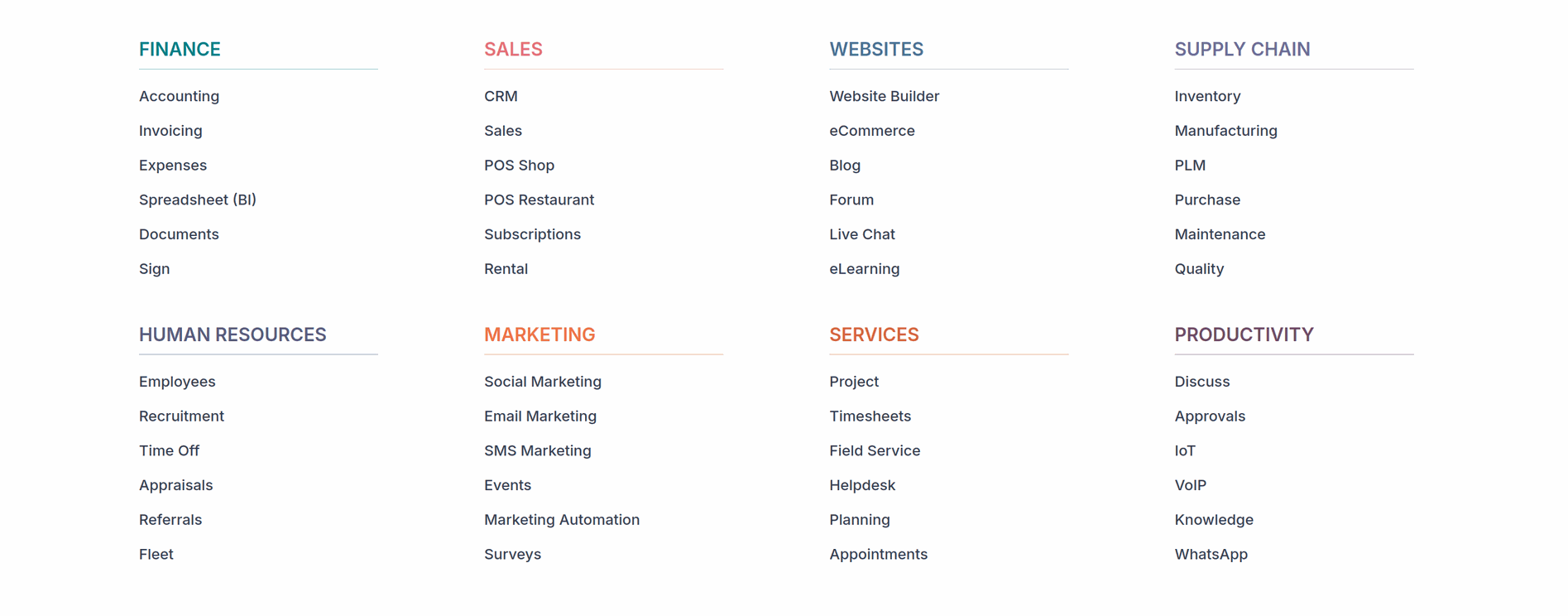 What can you do with Odoo?
1 CRM Module
The CRM (Customer Relationship Management) module in Odoo helps businesses manage customer relationships and sales opportunities effectively. It allows companies to track leads, manage sales pipelines, and improve communication with customers.
- Capture and manage leads from different sources.
- Convert leads into sales opportunities easily.
- Track opportunities through a visual sales pipeline.
- Schedule calls, meetings, and follow-ups with customers.
- Assign leads to sales team members for better management.
- Maintain customer communication history in one place.
- Generate reports to analyze sales performance and opportunities.
This module helps businesses organize their sales activities, improve customer relationships, and increase the chances of closing deals.
2 Sales Module
The Sales module in Odoo helps businesses manage the complete sales process, from creating quotations to confirming customer orders. It allows companies to handle sales activities efficiently and keep track of customer transactions in one place.
- Create and send quotations to customers quickly.
- Convert quotations into sales orders with a single click.
- Manage customer information and sales history.
- Track order status from confirmation to delivery.
- Apply pricing rules, taxes, and discounts automatically.
- Generate invoices directly from sales orders.
- Monitor sales performance through reports and dashboards.
This module helps businesses simplify the sales process, improve customer service, and manage orders more effectively.
3 Purchase Module
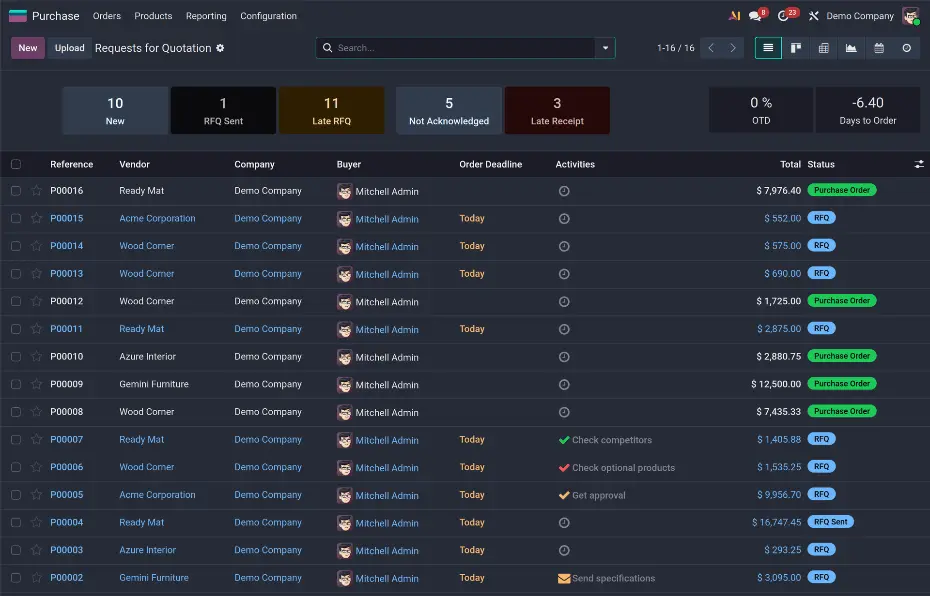
The Purchase module in Odoo helps businesses manage their procurement process efficiently. It allows companies to handle supplier management, purchase orders, and product deliveries in a structured way, ensuring smooth purchasing operations.
- Create and manage purchase orders for suppliers easily.
- Maintain supplier details and track vendor information.
- Request quotations from multiple vendors to compare prices.
- Track incoming shipments and product deliveries.
- Automatically update inventory when goods are received.
- Manage purchase agreements and supplier pricing.
- Generate purchase reports to analyze spending and supplier performance.
This module helps businesses streamline purchasing activities, maintain good supplier relationships, and ensure products are available when needed.
4 Inventory Module
The Inventory module in Odoo helps businesses manage their stock and warehouse operations efficiently. It allows companies to track product quantities, monitor stock movements, and maintain accurate inventory records in real time.
- Track product stock levels across warehouses and locations.
- Manage incoming and outgoing shipments of products.
- Automatically update inventory when products are bought or sold.
- Monitor stock movements between different warehouse locations.
- Set reorder rules to prevent stock shortages.
- Manage multiple warehouses within the same system.
- Generate inventory reports to analyze stock availability and product movement.
This module helps businesses maintain accurate stock control, reduce inventory errors, and ensure products are available when needed.
5 Point of Sale (POS) Module
The Point of Sale (POS) module in Odoo helps businesses manage in-store sales quickly and efficiently. It provides a user-friendly interface that allows employees to process customer purchases, manage products, and track sales in real time.
- Process sales quickly using an easy and interactive POS screen.
- Accept multiple payment methods such as cash, cards, and digital payments.
- Manage products and pricing directly from the POS system.
- Track daily sales and transactions in real time.
- Print or send digital receipts to customers.
- Automatically update inventory after each sale.
- Generate sales reports to analyze store performance.
This module helps retail businesses improve checkout speed, manage store operations efficiently, and keep sales records organized.
6 Project Module
The Project module in Odoo helps businesses plan, organize, and manage their projects efficiently. It allows teams to track tasks, collaborate with team members, and monitor project progress in one centralized platform.
- Create and manage projects for different teams or clients.
- Break projects into tasks and subtasks for better organization.
- Assign tasks to team members and track their progress.
- Set deadlines and priorities for project activities.
- Monitor project status using visual views like Kanban.
- Track time spent on tasks(Timesheet) for better productivity management.
- Generate reports to analyze project performance and progress.
This module helps teams stay organized, improve collaboration, and ensure projects are completed on time.
7 Marketing Module
The Marketing module in Odoo helps businesses promote their products and services effectively. It provides tools to create marketing campaigns, reach customers through different channels, and analyze campaign performance.
- Create and manage marketing campaigns from a single platform.
- Send email marketing campaigns to targeted customer groups.
- Automate marketing activities based on customer actions.
- Manage leads generated from marketing campaigns.
- Schedule and track social media posts.
- Analyze campaign performance using reports and dashboards.
- Improve customer engagement through personalized communication.
This module helps businesses attract new customers, maintain relationships with existing customers, and measure the effectiveness of their marketing efforts.
8 HR Module
The HR (Human Resources) module in Odoo helps businesses manage employee information and HR activities efficiently. It provides tools to organize employee records, track attendance, manage leaves, and handle various HR processes in one system.
- Maintain employee records including personal and job details.
- Track employee attendance and working hours.
- Manage leave requests and approvals easily.
- Organize recruitment and hiring processes.
- Handle employee contracts and payroll (based on configuration).
- Monitor employee performance and activities.
- Generate HR reports for better workforce management.
This module helps businesses streamline HR operations, maintain accurate employee data, and improve overall workforce management.
9 Manufacturing Module
The Manufacturing module in Odoo helps businesses manage their production processes efficiently. It allows companies to plan manufacturing activities, track production orders, and manage raw materials and finished products in an organized way.
- Create and manage manufacturing orders for product production.
- Define Bills of Materials (BoM) for products and components.
- Track raw materials and finished goods during production.
- Plan production schedules to manage manufacturing tasks.
- Monitor work orders and production stages in real time.
- Automatically update inventory when products are manufactured.
- Generate production reports to analyze manufacturing performance.
This module helps manufacturing businesses improve production planning, reduce errors, and ensure efficient use of resources.
10 Website Module
The Website module in Odoo helps businesses create and manage their online presence easily. It provides a user-friendly website builder that allows companies to design professional websites without needing advanced technical skills.
- Create and design company websites using a drag-and-drop builder.
- Add and manage web pages such as home, about, and services.
- Display product catalogs and business information online.
- Integrate eCommerce features to sell products through the website.
- Add blogs and articles to share updates and information.
- Include contact forms for customer inquiries.
- Manage website content easily from the Odoo dashboard.
This module helps businesses build a strong online presence and connect with customers through a professional website.
11 Appointment Module
The Appointment module in Odoo helps businesses schedule and manage meetings with customers efficiently. It allows clients to book appointments online based on available time slots, making the scheduling process simple and organized.
- Allow customers to book appointments online through a booking page.
- Set available time slots for meetings or services.
- Automatically confirm appointments and update schedules.
- Send reminders and notifications to customers and staff.
- Integrate appointments with calendars for better scheduling.
- Manage multiple services or meeting types.
- Reduce manual scheduling and avoid booking conflicts.
This module helps businesses organize meetings efficiently, save time, and improve customer convenience when booking appointments.
12 Events Module in Odoo
The Events module in Odoo helps businesses plan, organize, and manage events efficiently. It allows organizations to handle event registrations, schedules, and participant information from a single platform.
- Create and manage different types of events such as conferences, workshops, or seminars.
- Allow participants to register online for events.
- Manage event schedules and sessions easily.
- Track attendee information and registrations.
- Send event invitations and reminders to participants.
- Manage event tickets and payments if required.
- Generate reports to analyze event participation and performance.
This module helps businesses organize successful events while keeping all event-related information well managed and accessible.
13 Helpdesk Module in Odoo
The Helpdesk module in Odoo helps businesses manage customer support and service requests efficiently. It allows companies to track issues, respond to customer inquiries, and ensure problems are resolved in an organized way.
- Create and manage support tickets for customer issues.
- Track the status of each ticket until it is resolved.
- Assign tickets to support team members for quick handling.
- Communicate with customers directly through the ticket system.
- Set priorities and deadlines for support requests.
- Monitor team performance through helpdesk reports.
- Improve customer satisfaction with faster and organized support.
This module helps businesses provide better customer service and manage support operations more effectively.
14 Discuss Module
The Discuss module in Odoo is a communication tool that helps teams collaborate and share information easily within the system. It allows employees to send messages, create channels, and discuss work-related topics without needing external chat applications.
- Send direct messages to team members inside Odoo.
- Create discussion channels for teams, departments, or projects.
- Share files, documents, and links within conversations.
- Tag colleagues using @mentions to notify them quickly.
- Integrate communication with other modules like CRM, Projects, and Helpdesk.
- Keep all business discussions organized in one place.
This module helps teams communicate efficiently and improves collaboration across different departments.
Localization in Odoo
Localization in Odoo helps businesses adapt the system to meet the legal, tax, and accounting requirements of different countries around the world.
It supports country-specific taxes, accounting standards, currencies, and multiple languages, allowing businesses to operate smoothly in both local and international markets while maintaining accurate financial records.
Reports in Odoo
Reports in Odoo provide businesses with clear insights into their operations and performance. Odoo automatically generates reports from different modules such as sales, inventory, accounting, HR, and projects, allowing managers to monitor business activities in real time.
These reports help businesses analyze important information such as sales performance, financial transactions, stock levels, employee activities, and project progress. With easy-to-understand dashboards and visual charts, decision-makers can quickly evaluate the health of their business.
Odoo also allows businesses to customize reports according to their needs, making it easier to track key metrics and generate meaningful insights. By using accurate and real-time reports, organizations can make informed decisions and improve overall efficiency.
Official Odoo Platforms to Learn and Explore
Demo Platform
If you want to explore Odoo without installing or configuring anything, the demo.odoo.com platform provides a quick and easy way to try the system online. It allows users to access a fully functional demo environment where they can experience how Odoo works in real business scenarios.
The demo environment is useful businesses requirement evaluating ERP solutions, or developers who want to quickly see how Odoo features work. It provides temporary access credentials that allow you to log in and explore the interface, workflows, and applications without needing any installation.
You can try the Odoo demo here:
https://demo.odoo.com/
Odoo Runbot
Odoo Runbot is an online platform used to test and explore different versions of Odoo directly in a web browser.
When core developers of Odoo S.A. push code to the Odoo repository, Runbot builds a temporary Odoo server to verify whether the code works correctly or causes errors.
Through this platform, the public can also log in and try the latest updates, new features, and improvements before they are officially released or installed in production systems.
Version Updates in Odoo :
Major Version Release (Every Year)
Odoo releases a new major version once every year. Each new version introduces significant improvements such as new features, better user interface, enhanced performance, and updated modules. For example, versions like Odoo 17, Odoo 18, and Odoo 19 are released annually with many new capabilities.
Minor Updates and Improvements (Every Three Months)
Between major releases, Odoo continuously provides smaller updates that include bug fixes, performance improvements, and security patches. These updates ensure that the system remains stable and reliable. For example, versions like odoo19.1 ,odoo 19.2
Why Runbot is Useful
- Explore latest three Odoo versions.
- Test newly added features and improvements
-
Compare changes between versions
You can explore here:
https://runbot.odoo.com/
Odoo Learning Documentation
Odoo Documentation is the official learning and reference resource provided by Odoo to help users, developers, and businesses understand how to use the platform effectively. It contains detailed guides, tutorials, and explanations for all Odoo features, modules, and technical development processes.
You can explore the official Odoo documentation here:
https://www.odoo.com/documentation
This resource is helpful for anyone who wants to learn, implement, or develop solutions using the Odoo platform.
Odoo eLearning Platform
The Odoo eLearning Platform is an online learning system provided by Odoo that helps users understand how to use different Odoo applications and features. It offers structured learning materials, training courses, and tutorials designed for beginners, business users, and developers.
You can explore the Odoo eLearning platform here:
https://www.odoo.com/slides
This platform provides valuable learning materials for both beginners and professionals working with Odoo.
Odoo Apps Store
The Odoo Apps Store is an online marketplace where users can find and install additional applications to extend the functionality of Odoo. It contains thousands of modules developed by Odoo as well as by the global developer community.
These apps allow businesses to add new features, customize workflows, and integrate Odoo with other systems based on their specific needs. The Apps Store includes modules for various business functions such as accounting, sales, inventory, manufacturing, HR, marketing, and many more.
You can explore the Odoo App Store here:
https://apps.odoo.com/
This platform helps businesses and developers discover new tools that extend the power of the Odoo ecosystem.
Odoo Cloud Platform
Odoo.sh is the official cloud platform provided by Odoo for hosting, developing, and managing Odoo applications. It is mainly designed for developers and businesses who want an easy way to deploy and maintain their Odoo projects online.
With Odoo.sh, users can develop custom modules, test changes, and deploy their Odoo applications without worrying about server setup or technical infrastructure. The platform provides tools for development, testing, staging, and production environments in one place.
Key Features of Odoo.sh
- Cloud hosting for Odoo projects without manual server configuration.
- Automatic deployment of code changes using GitHub repositories.
- Separate environments for development, testing, and production.
- Automatic backups and updates to keep data secure.
- Easy collaboration for development teams working on Odoo projects.
- Integrated development tools for testing custom modules and features.
You can learn more about Odoo.sh here:
https://www.odoo.sh/
Technical Knowledge Required for Odoo
To work with Odoo effectively, especially in development and customization, it is helpful to have knowledge of several technologies. Odoo is built using a combination of backend and frontend technologies that work together to create a complete business management system.
Python
Python is the primary programming language used in Odoo. It is mainly used for developing business logic, creating custom modules, handling workflows, and managing server-side operations.
PostgreSQL
Odoo uses PostgreSQL as its database management system. It stores all business data such as customers, products, transactions, and configurations. Knowledge of PostgreSQL helps developers manage data, write queries, and optimize database performance.
OWL (Odoo Web Library)
OWL is the JavaScript framework used in modern Odoo versions to build interactive user interfaces. It helps developers create dynamic frontend components that improve the user experience within the Odoo web client.
Web Technologies
XML
XML is used in Odoo to define views, menus, actions, and data structures within modules.
HTML
HTML is used to structure web pages and reports in Odoo.
CSS
CSS is used for styling the user interface and improving the visual appearance of Odoo views and web pages.
Bootstrap
Bootstrap is used to create responsive layouts and modern UI components in Odoo’s web interface.
JavaScript
JavaScript is used to add dynamic behavior and interactivity to the Odoo frontend, especially when working with client-side features and custom widgets.
Together, these technologies form the technical foundation required to develop, customize, and maintain Odoo applications.
Who should use Odoo?
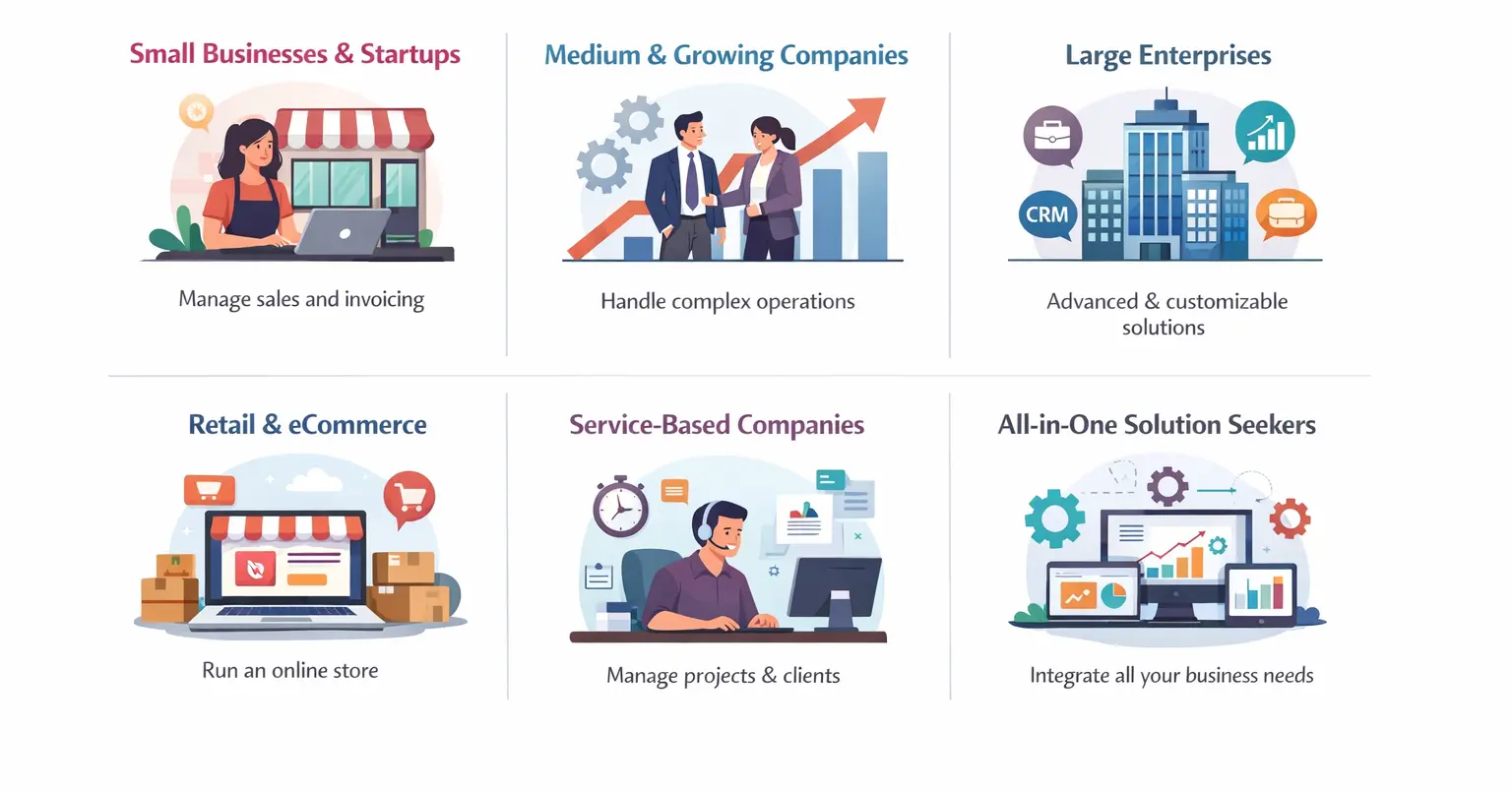
Odoo is designed to support businesses of different sizes and industries. Its flexible and modular structure makes it suitable for organizations that want to manage multiple business operations through a single, integrated system. Whether a company is small, growing, or well established, Odoo can help streamline processes and improve efficiency.
Small Businesses and Startups
Small businesses and startups can use Odoo to manage essential operations such as sales, invoicing, accounting, and customer management without investing in multiple software tools. Odoo provides an affordable and scalable solution that grows along with the business.
Medium and Growing Companies
As businesses expand, managing operations becomes more complex. Odoo helps growing companies handle larger volumes of sales, inventory, financial data, and customer interactions. Its integrated modules make it easier to coordinate different departments within the organization.
Large Enterprises
Large organizations can benefit from Odoo’s advanced features and customization capabilities. Enterprises can implement multiple modules such as CRM, Accounting, Inventory, HR, and eCommerce while customizing workflows to match their complex business processes.
Retail and eCommerce Businesses
Retailers and online businesses can use Odoo to manage product catalogs, inventory, orders, and customer interactions in one platform. The integrated eCommerce features allow businesses to connect their online store with sales, inventory, and accounting systems.
Service-Based Companies
Companies that provide services—such as consulting firms, agencies, or IT companies—can use Odoo to manage projects, track time, handle client relationships, and generate invoices for their services.
Organizations Looking for an All-in-One Solution
Any organization that wants to replace multiple disconnected tools with a single integrated system can benefit from Odoo. By bringing together different business functions into one platform, Odoo helps businesses improve efficiency, collaboration, and overall productivity.
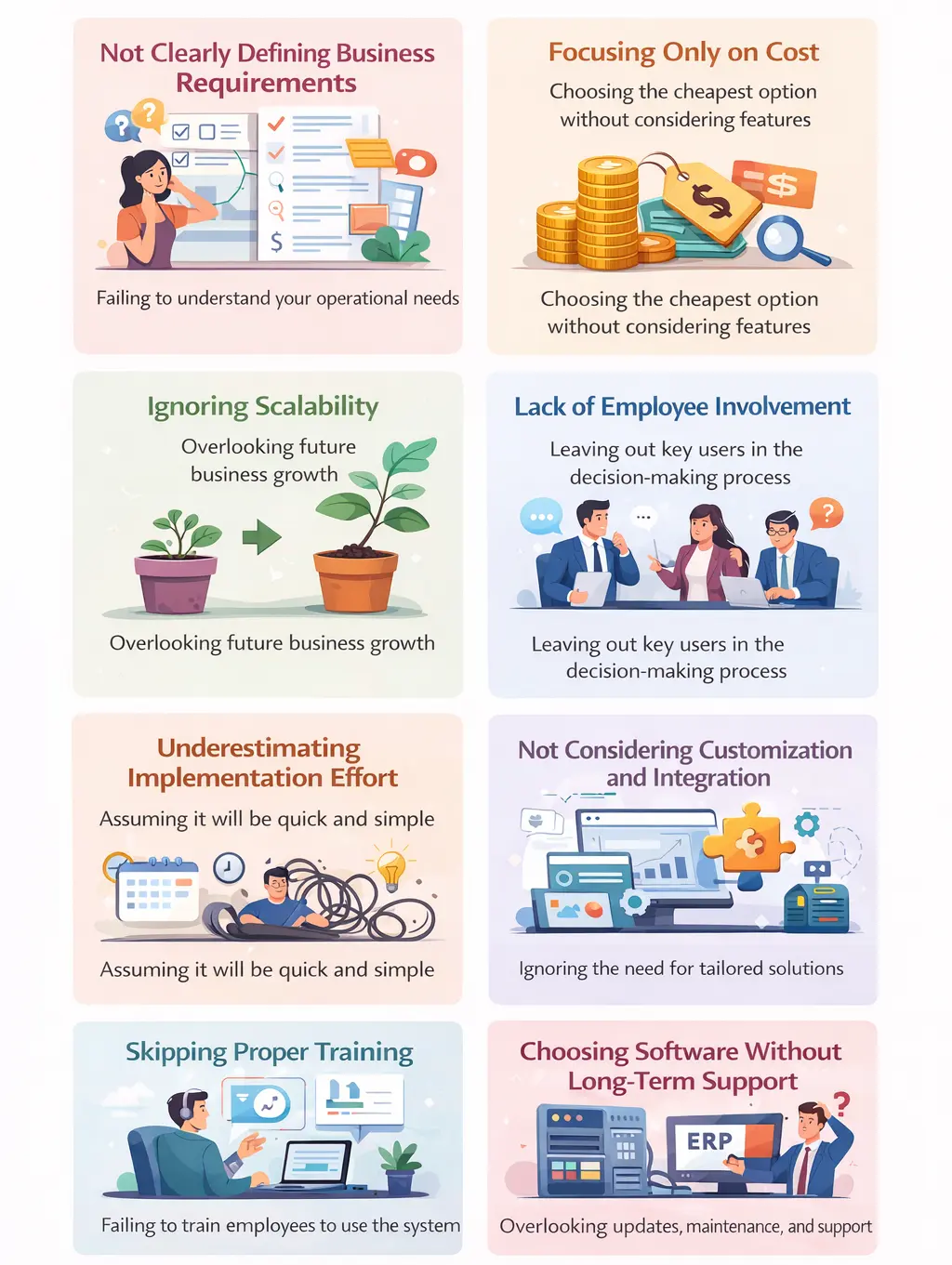
Common mistakes business makes before choosing ERP
Choosing the right ERP system is a critical decision for any business. However, many organizations make common mistakes during the selection process, which can lead to implementation challenges, increased costs, or systems that do not fully meet their needs. Understanding these mistakes can help businesses make better and more informed decisions when selecting an ERP solution.
Not Clearly Defining Business Requirements
One of the biggest mistakes businesses make is choosing an ERP system without clearly understanding their own requirements. Companies should first analyze their workflows, operational challenges, and future goals before selecting an ERP solution.
Focusing Only on Cost
While budget is an important factor, businesses should also consider features, scalability, and long-term value when choosing an ERP system. A well-balanced solution like Odoo offers both affordability and powerful capabilities to support growing business needs.
Ignoring Scalability
Some businesses choose ERP systems that work for their current size but cannot support future growth. An ERP should be flexible and scalable so that it can adapt as the company expands and business processes become more complex.
Lack of Employee Involvement
ERP systems affect multiple departments within an organization. When employees and department managers are not involved in the decision-making process, the chosen system may not align well with the daily needs of the teams who will use it.
Underestimating Implementation Effort
ERP implementation requires proper planning, training, and system configuration. Proper preparation helps ensure a smooth implementation and allows businesses to gain the full benefits of the system.
Not Considering Customization and Integration
Every business has unique processes. Choosing an ERP system that cannot be customized or integrated with existing tools can create limitations and inefficiencies in the long run.
Skipping Proper Training
Even the best ERP system will fail if employees do not know how to use it effectively. Businesses should invest in proper training to ensure teams understand the system and can fully utilize its capabilities.
Choosing Software Without Long-Term Support
ERP systems require updates, maintenance, and technical support. Businesses should ensure the ERP provider offers reliable support and continuous improvements to keep the system running smoothly.
Making an Informed ERP Choice
By avoiding these common mistakes and carefully evaluating business needs, companies can choose an ERP system that improves efficiency, supports growth, and helps them manage operations more effectively.

Written By
Pavitra N Chikkannavar
Odoo Developer
Rawdah Technology
kerala, India
📞 +91 8078252055